Lotus365 Withdrawal Guide 2026 – How to Withdraw Your Winnings Fast
You’ve won. Now you want your money in your bank account fast, safely, and without confusion. This is the only Lotus365 withdrawal guide you’ll ever need.
This guide covers every withdrawal method available in 2026, exact processing times for each, minimum and maximum limits, KYC requirements, what to do when a withdrawal fails, and answers to every question Indian players ask about getting paid on Lotus 365.
No vague answers. No filler. Just a complete, step-by-step walkthrough from clicking “Withdraw” to seeing money in your account.
Quick Summary for Experienced Users: Minimum withdrawal: ₹500 | Maximum daily: ₹5,00,000 | Fastest method: UPI (15–30 minutes) | KYC required: Yes (PAN + Aadhaar, first time only) | Processing: 24/7 including weekends
Table of Contents
Before You Withdraw – 4 Things to Check First
Before you submit a withdrawal request, confirm these four things to avoid delays:
1. KYC Verification is Complete Your PAN card and Aadhaar must be verified before your first withdrawal. If you haven’t done this yet, go to Account → KYC Verification and upload your documents. Approval takes 15–30 minutes on working days. After your first successful withdrawal, KYC is never required again for the same account.
2. Your Bank Details Are Saved Correctly A single wrong digit in your IFSC code or account number causes the withdrawal to fail and return to your wallet after 2–4 hours. Go to Account → Payment Methods and double-check your saved bank details or UPI ID before proceeding.
3. Your Winnable Balance Covers the Amount Lotus365 separates your balance into Bonus Balance (cannot be withdrawn until wagering requirements are met) and Winnable Balance (fully withdrawable). Only your Winnable Balance is available for withdrawal. Check the breakdown in your wallet before entering an amount.
4. Active Bonus Wagering Requirements If you claimed a deposit bonus, check the wagering requirement status under Promotions → My Bonuses. Submitting a withdrawal before meeting requirements will either forfeit the bonus or be declined. The 8x wagering requirement on the ₹500 welcome bonus means you need to wager ₹4,000 before that bonus converts to withdrawable cash.
How to Withdraw Money from Lotus365 – Step-by-Step
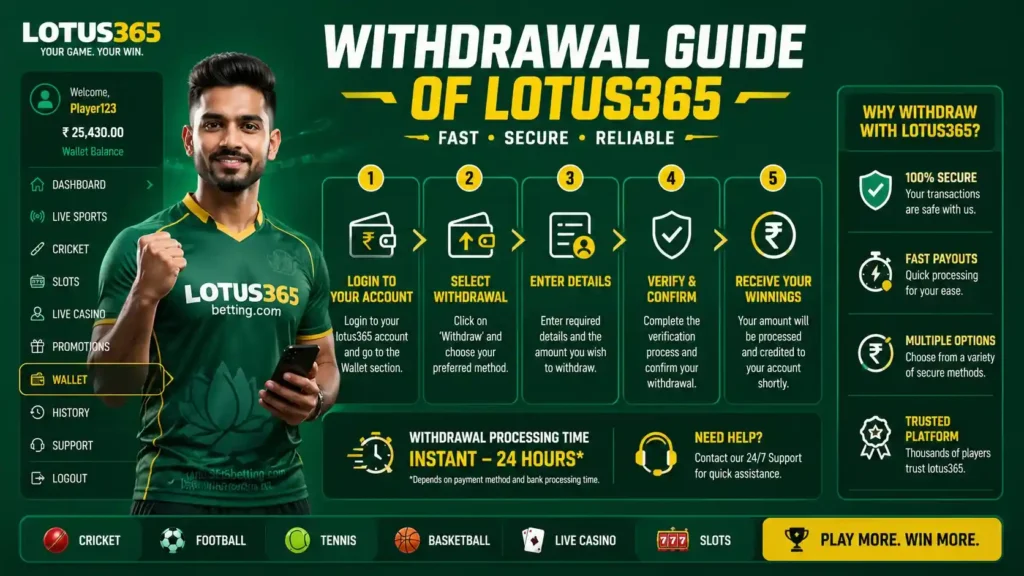
Step 1 – Log In to Your Account
Open the Lotus365 app or website and log in with your registered mobile number and password. If you use Face ID on the app, this takes under 5 seconds.
Step 2 – Go to Your Wallet
On the app: Tap the Wallet icon at the bottom of the screen. On the website: Click your profile icon (top right) → My Wallet.
Step 3 – Select “Withdraw”
You’ll see two tabs: Deposit and Withdraw. Tap Withdraw.
Step 4 – Choose Your Withdrawal Method
Select from:
- UPI (GPay, PhonePe, Paytm, BHIM)
- IMPS Bank Transfer
- NEFT / RTGS
- Agent Withdrawal
The method you used for your last deposit is usually shown first.
Step 5 – Enter the Withdrawal Amount
Type the amount you want to withdraw. The page will show your available Winnable Balance above the input field. Minimum: ₹500. Maximum per transaction: ₹1,00,000. Maximum per day: ₹5,00,000.
Step 6 – Confirm Your Payment Details
If you’re withdrawing to UPI, your saved VPA (UPI ID) will appear. If withdrawing to a bank account, verify the account number and IFSC. If you need to change or add a new account, tap Manage Payment Methods first.
Step 7 – Enter Your UPI PIN or OTP Verification
For security, every withdrawal requires one of the following:
- Your UPI PIN (for UPI withdrawals)
- An OTP sent to your registered mobile number (for bank transfers)
This step cannot be skipped it is a mandatory fraud prevention measure.
Step 8 – Submit and Track Your Withdrawal
Tap Confirm Withdrawal. You’ll see a confirmation screen with:
- A unique Transaction ID (save this)
- The withdrawal amount
- Estimated processing time
- Current status: Pending → Processing → Completed
You can track the status anytime in My Wallet → Transaction History.
Lotus365 Withdrawal Methods – Complete 2026 Comparison
| Method | Min Amount | Max Per Day | Processing Time | Fee | Available 24/7 |
|---|---|---|---|---|---|
| UPI (GPay / PhonePe / Paytm) | ₹500 | ₹5,00,000 | 15 – 30 minutes | ₹0 | ✅ Yes |
| IMPS Bank Transfer | ₹500 | ₹5,00,000 | 30 min – 2 hours | ₹0 | ✅ Yes |
| NEFT | ₹500 | ₹5,00,000 | 2 – 6 hours | ₹0 | ✅ Yes |
| RTGS | ₹2,00,000 | ₹5,00,000 | 1 – 4 hours | ₹0 | Business hours |
| Agent Withdrawal | ₹500 | Negotiable | Same day | ₹0 | Agent hours |
Zero fees on all methods. Lotus365 does not charge processing fees on any withdrawal. What you see in your winnable balance is exactly what reaches your bank.
Lotus365 Withdrawal Time – What to Realistically Expect
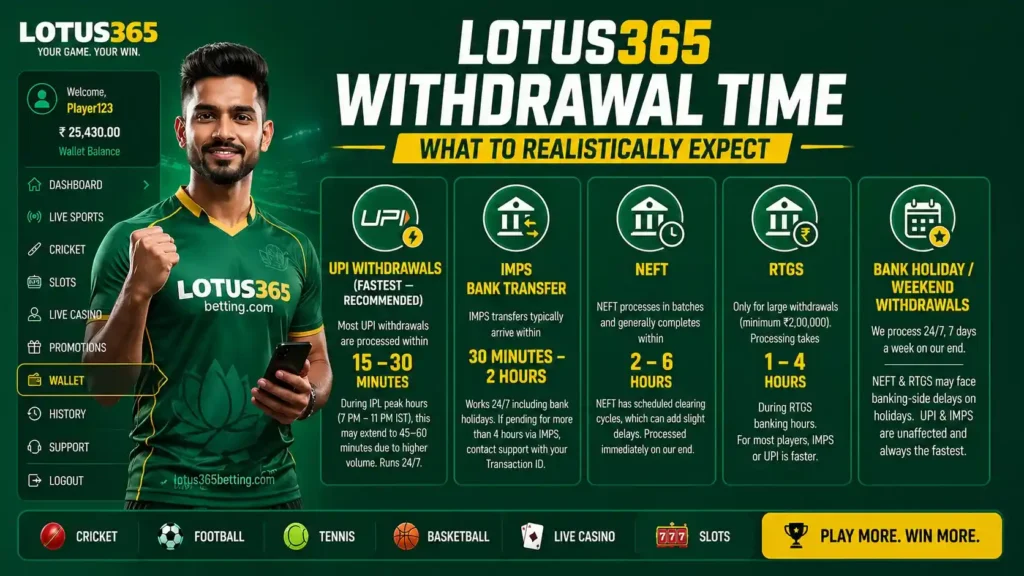
UPI Withdrawals (Fastest — Recommended)
UPI is the fastest and most recommended method for Indian players. Most UPI withdrawals are processed within 15 to 30 minutes. During IPL peak hours (7 PM – 11 PM IST), this may extend to 45–60 minutes due to higher volume, but the system runs 24/7 without breaks.
IMPS Bank Transfer
IMPS transfers typically arrive within 30 minutes to 2 hours. IMPS works 24/7 including bank holidays, making it the best bank transfer option for night-time withdrawals. If your withdrawal has been pending for more than 4 hours via IMPS, contact support with your Transaction ID.
NEFT
NEFT processes in batches and generally completes within 2 to 6 hours. Unlike IMPS, NEFT has scheduled clearing cycles, which can add slight delays. However, Lotus365’s NEFT withdrawals are processed on the platform side immediately — the delay is purely in the banking system’s batch schedule.
RTGS
RTGS is only relevant for large withdrawals (minimum ₹2,00,000). Processing takes 1 to 4 hours during RTGS banking hours. For most players, IMPS or UPI is faster and more practical.
Bank Holiday / Weekend Withdrawals
Lotus365 processes withdrawals 24 hours a day, 7 days a week on their end. However, NEFT and RTGS may experience banking-side delays on national holidays. UPI and IMPS are unaffected by bank holidays and remain the fastest options at all times.
KYC Verification for Withdrawals – Full Walkthrough
KYC (Know Your Customer) verification is required before your first withdrawal only. After that, your account is permanently verified.
Documents Required
- PAN Card (mandatory) — front image, clear and in focus
- Aadhaar Card (mandatory) — front and back images
- Selfie holding your PAN card (required on some accounts)
How to Submit KYC
- Go to Account → KYC Verification
- Upload PAN card image (JPG or PNG, under 5 MB)
- Upload Aadhaar front and back
- Submit for review
- Receive approval confirmation via SMS/app notification
KYC Approval Time
- Standard approval: 15 to 30 minutes on weekdays
- Peak periods (IPL season): Up to 2 hours
- Rejected submissions (blurry images, mismatched names): Re-upload required, adds another review cycle
Common KYC Rejection Reasons
- Name on PAN does not match the name on your Lotus365 account
- Image is blurry, cropped, or has glare
- Aadhaar card has expired (check the validity date)
- File size exceeds the upload limit (compress images below 5 MB)
Withdrawal Limits on Lotus365 – Everything Explained
| Limit Type | Amount |
|---|---|
| Minimum withdrawal | ₹500 |
| Maximum per single transaction | ₹1,00,000 |
| Maximum per day | ₹5,00,000 |
| Maximum per week | No stated weekly cap |
| Bonus to real money conversion minimum | 8x wagering on bonus amount |
No hidden limits. Lotus365 does not impose undisclosed withdrawal caps. If you win above ₹5,00,000 in a single day, contact the support team directly via in-app chat or WhatsApp — large withdrawals above the daily limit can be arranged through the support team within the same day.
Withdrawal Failed? Here’s Exactly What to Do
A failed withdrawal is returned to your Lotus365 wallet within 2 to 4 hours. Here are the most common reasons and the exact fix for each:
Wrong Bank Account Number or IFSC Code
What happens: The transfer is initiated but bounces back from the bank within 2–4 hours. Fix: Go to Account → Payment Methods → Edit Bank Account. Re-enter your account number slowly (do not copy-paste from notes — type it manually). Verify the IFSC code on your bank’s official website or passbook.
UPI ID Not Active or Linked to a Different Account
What happens: UPI transfer fails immediately and returns to wallet. Fix: Open your UPI app (GPay/PhonePe) and verify your UPI ID is active. Some users have multiple UPI IDs — ensure the one saved on Lotus365 is linked to a currently active bank account.
KYC Not Completed
What happens: Withdrawal request is declined immediately with a KYC pending notification. Fix: Complete KYC as described in the section above. You cannot withdraw without it.
Wagering Requirement Not Met
What happens: Withdrawal is declined with a “bonus conditions not met” message. Fix: Check your active bonuses and their remaining wagering requirements under Promotions → My Bonuses. Complete the required wagering, then retry.
Withdrawal Stuck in “Processing” for Over 4 Hours
What happens: Status shows “Processing” but nothing has arrived. Fix: This is rare (affects less than 1% of transactions). Contact Lotus365 support via the in-app chat or WhatsApp. Provide your Transaction ID from the withdrawal confirmation screen. The support team resolves these within 30 minutes.
Bank Account Name Doesn’t Match Lotus 365 Account Name
What happens: Transfer may fail or be flagged for fraud review. Fix: Ensure the name on your bank account exactly matches the name on your Lotus365 account. If there is a legitimate difference (nickname vs full name), contact support to update your account name with KYC documentation.
Are Winnings from Lotus365 Taxable in India?
This is one of the most common questions Indian players don’t find answered on betting platforms. Here is the factual answer:
Under Section 115BB of the Income Tax Act, winnings from online gaming and betting in India are taxed at a flat rate of 30% plus applicable surcharge and cess, regardless of your income tax bracket.
Additionally, under the Finance Act 2023, online gaming platforms must deduct TDS (Tax Deducted at Source) at 30% on net winnings above ₹100 per financial year.
What this means practically:
- Lotus365 may deduct TDS on large withdrawals above the applicable threshold
- You must declare gambling winnings in your ITR (Income Tax Return) under “Income from Other Sources”
- Losses from gambling cannot be offset against other income
Consult a qualified CA or tax professional for advice specific to your situation. This information is provided for general awareness only.
Withdrawal Security – How Lotus365 Protects Your Money
Every withdrawal on Lotus365 passes through a multi-layer security process:
SSL 256-Bit Encryption All data transmitted between your device and Lotus365’s servers is encrypted with 256-bit SSL the same encryption standard used by major Indian banks, including HDFC, ICICI, and SBI.
OTP Verification on Every Withdrawal No withdrawal can be completed without an OTP sent to your registered mobile number. Even if someone has your login credentials, they cannot withdraw money without physical access to your registered SIM card.
Manual Review on Large Withdrawals Withdrawals above ₹50,000 may trigger a manual review by the Lotus365 compliance team. This is a standard anti-money-laundering measure and typically adds 15–30 minutes to processing time.
Real-Time Fraud Monitoring An automated system monitors all transactions for unusual patterns (multiple rapid withdrawals, unusual amounts, new device access). Flagged transactions are paused and verified before processing.
Transaction Receipt Every completed withdrawal generates a unique Transaction ID and a digital receipt accessible in My Wallet → Transaction History. This serves as your official proof of payment. Save or screenshot your transaction ID immediately after submitting you’ll need it if you contact support about any transaction.
Lotus365 Withdrawal vs Competitors – How It Compares
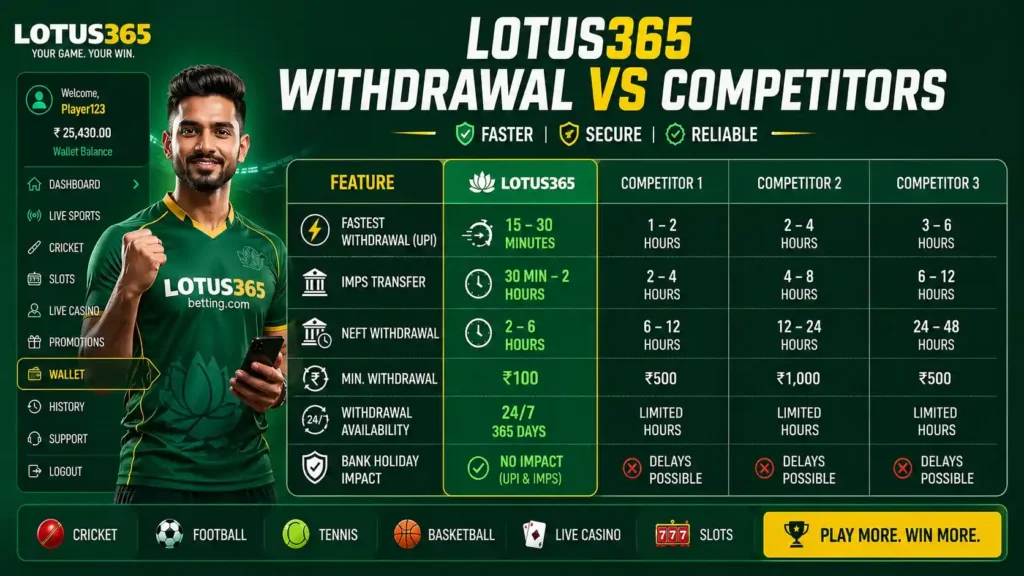
| Platform Feature | Lotus365 | Industry Average |
|---|---|---|
| Minimum withdrawal | ₹500 | ₹1,000 – ₹2,000 |
| UPI withdrawal time | 15 – 30 min | 2 – 24 hours |
| Withdrawal fees | ₹0 | ₹0 – ₹50 |
| 24/7 processing | ✅ Yes | Often business hours only |
| KYC required after first time | ❌ Not again | Often repeated |
| Max daily withdrawal | ₹5,00,000 | ₹1,00,000 – ₹2,00,000 |
| Support response time | Under 30 min | 1 – 24 hours |
FAQs – Lotus365 Withdrawal
What is the minimum withdrawal amount on Lotus365?
The minimum withdrawal amount is ₹500 across all payment methods including UPI, IMPS, and bank transfer. There is no minimum on agent-based withdrawals, though this is subject to the agent’s own terms.
How long does a Lotus365 UPI withdrawal take?
UPI withdrawals typically process in 15 to 30 minutes. During peak hours such as IPL match evenings, this may extend to 45–60 minutes. UPI is the fastest withdrawal method available on the platform and is recommended for all players.
Does Lotus365 charge fees on withdrawals?
No. Lotus365 charges zero fees on all withdrawal methods including UPI, IMPS, NEFT, RTGS, and agent withdrawals. The amount you enter is exactly what arrives in your bank account.
How many times can I withdraw per day?
There is no stated limit on the number of daily withdrawal requests, but the combined total cannot exceed ₹5,00,000 per day. For withdrawals above this daily limit, contact the support team directly.
Why is my Lotus365 withdrawal stuck in “Pending”?
A withdrawal remains in “Pending” status while the Lotus365 backend team is processing it. For UPI, this typically resolves within 30 minutes. For bank transfers, up to 4 hours. If your withdrawal has been pending for more than 4 hours, contact Lotus365 support with your Transaction ID via in-app chat or WhatsApp.
Can I withdraw to a different bank account than I deposited from?
Yes, you can withdraw to any bank account or UPI ID that is registered under your name and matches your KYC details. You are not restricted to the same account used for deposits.
What happens if I enter the wrong bank account number?
The transfer will fail and the amount will return to your Lotus365 wallet within 2–4 hours. No money is lost. Update your bank details in Account → Payment Methods and resubmit the withdrawal.
Can I cancel a withdrawal after submitting?
Once a withdrawal moves to “Processing” status, it cannot be cancelled. Withdrawals in “Pending” status may be cancellable — contact support immediately via in-app chat if you need to cancel a pending request.
What is the maximum I can withdraw from Lotus365 in a single day?
The standard maximum daily withdrawal limit is ₹5,00,000. Players with larger wins above this limit can contact the Lotus365 support team directly — arrangements for higher withdrawals are handled on a case-by-case basis by the finance team.