
Lotus365 Register
Lotus365 signup is designed to be quick, mobile‑friendly, and secure so you can start exploring the platform within a couple of minutes. Follow carefully to avoid errors and make sure your account is verified properly.
Step 1: Visit the Official Lotus 365 Website
- Open your browser (Chrome, Safari, Edge, etc.).
- Type the official Lotus 365 domain in the address bar.
- Check that:
- The URL is spelled correctly.
- There is a secure padlock (HTTPS) in the address bar.
Always use the official domain to avoid fake or phishing websites.
Step 2: Click on “Lotus365 Register”
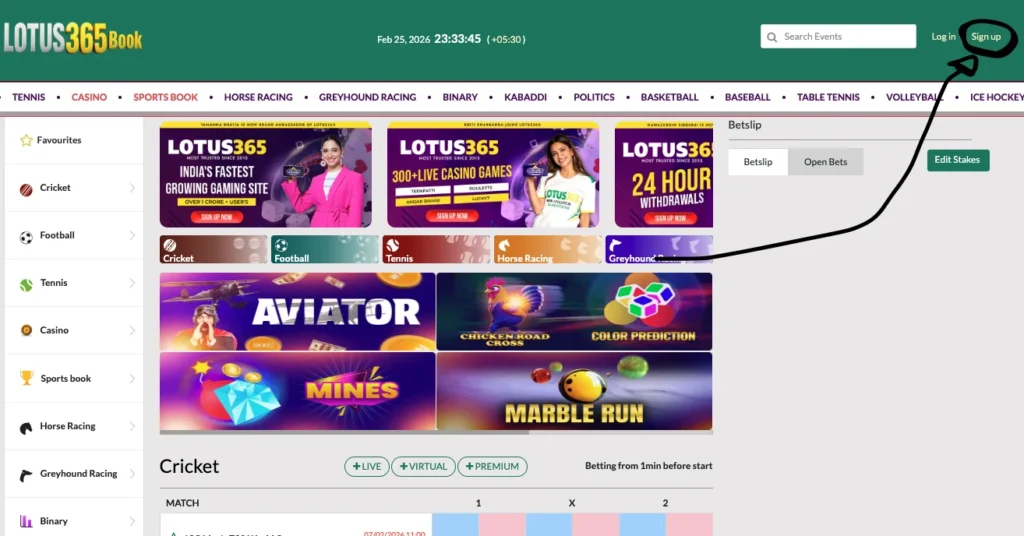
On the homepage, you will see options like Login and Signup / Register.
- Click on “Signup” or “Lotus 365 Signup”.
- This will open the registration form where you can create your new account.
Step 3: Fill the Lotus365 Signup Form
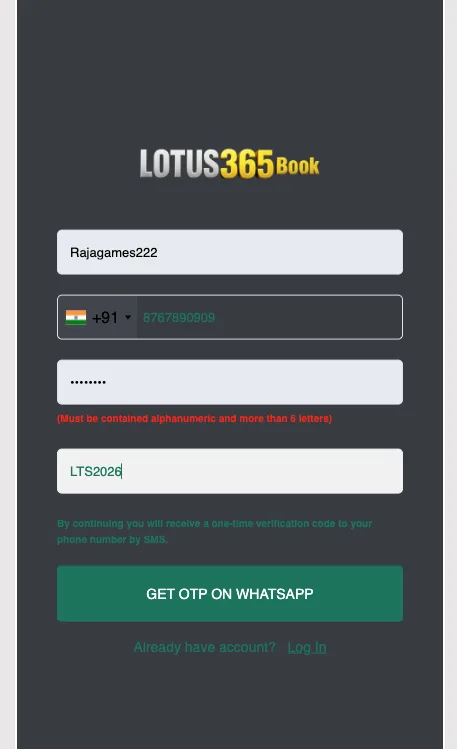
The signup form will ask for a few basic details. Fill them carefully:
1. Username
- Choose a username within these rules:
- Length: 4 to 15 characters
- Allowed: alphanumeric only (letters + numbers)
- Avoid:
- Spaces, special characters, and symbols
- Very obvious usernames like your full name or phone number
Example usernames:
- Good: CricketPro91, BetKing07, SpinMaster10
- Avoid:
1234, Ravi123456789012345, @Cool#User
2. Mobile Number (with Indian Country Code)
- Select India (+91) in the country code field.
- Enter your 10‑digit mobile number without spaces.
- Make sure:
- This is your active number, and
- You have WhatsApp and SMS enabled on it (OTP will come here).
3. Password
Password rules:
- Length: 6 to 20 characters
- Must contain alphabets + numbers (alphanumeric)
- Recommended:
- Mix upper/lowercase + numbers
- Avoid using only your name or DOB
Examples:
- Good: Lotus365Win91, PlaySafe2026
- Avoid: 123456, password, lotus123
Type your password slowly and carefully to avoid typos.
Step 4: OTP Consent – One‑Time Verification
Below the form, you will see a line like:
“By continuing you will receive a one‑time verification code to your phone number by SMS.”
This means:
- Lotus 365 will send you an OTP (One‑Time Password) to verify that the mobile number belongs to you.
- You must have access to that phone number before continuing.
Click on Continue / Sign Up / Get OTP to move to the OTP screen.
Step 5: Get OTP on WhatsApp (with 2‑Minute Timer)
After you submit the form:
- You will see an option like “Get OTP on WhatsApp” or similar.
- When you click it:
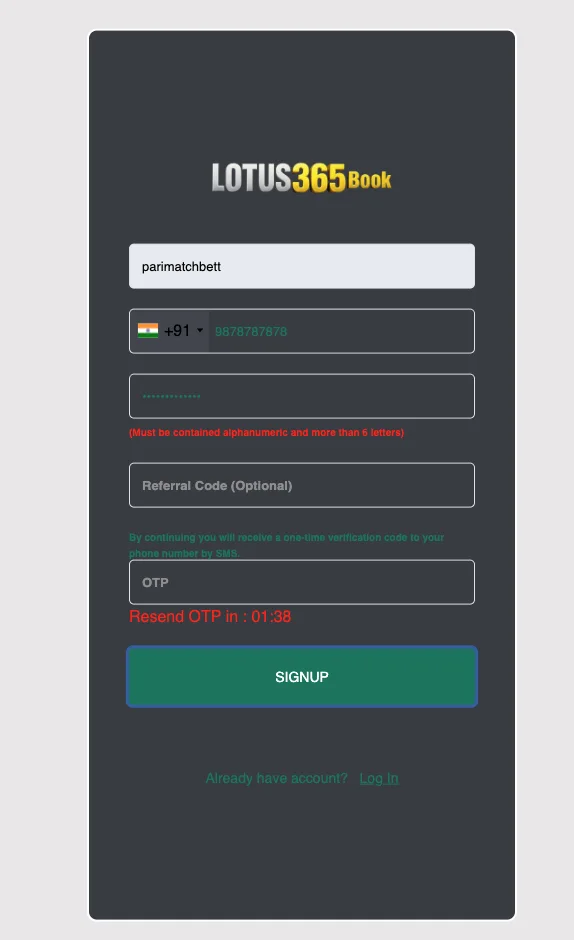
- An OTP input field appears.
- A 2‑minute countdown timer starts.
Check your WhatsApp and SMS for a message containing a 4–6 digit OTP code.
Example:
“Your Lotus365 verification code is 482619. Valid for 2 minutes.”
You must enter this OTP within 2 minutes.
Step 6: Enter OTP and Complete Signup
- Enter the OTP exactly as received (no spaces, no mistakes).
- Double‑check each digit.
- Click on “Sign Up” / “Verify & Create Account”.
If the OTP is correct and within time:
- Your Lotus365 account is created successfully.
- You can now login using your username and password.
If OTP is wrong or expired:
- Click Resend OTP and repeat the process.
- Make sure your network is stable and number is correct.
Things to Take Care of While Registering on Lotus 365
To avoid issues during Lotus365 signup, keep these points in mind:
- Use real details (mobile number, username you’ll remember).
- Don’t use temporary or random phone numbers.
- Keep your phone nearby to receive OTP instantly.
- Note down your username + password in a safe place.
- Never share your OTP, password, or login link with anyone, including unknown “support” accounts.

Referral Bonuses During Signup
If you have a referral code, make sure to use it during registration.
- Look for a field like “Referral Code” or “Agent Code” on the signup form.
- Enter the code exactly as given (uppercase/lowercase, digits).
Benefits of entering referral code (if applicable on your setup):
- Extra welcome bonus
- Special reload or cashback offers
- Access under a trusted agent or partner
If you do not have any referral, you can leave this field blank.
First Deposit Bonus After Signup
Once you finish Lotus365 signup and login for the first time:
- Go to Wallet / Deposit section.
- Check the welcome bonus offer details (percentage, maximum amount, rollover rules).
- Make your first deposit using supported payment methods (UPI, wallet, bank, etc.).
- The bonus may be:
- Credited automatically, or
- Activated after you click a “Claim Bonus” button.
Always read the terms & conditions of the first deposit bonus:
- Minimum deposit amount
- Wagering/rollover requirements
- Valid games/sports
This helps you use the bonus smartly and withdraw without problems later.
Why Lotus365 Signup Process Is So Easy
The Lotus365 sign up flow is kept simple and fast for Indian users:
- Mobile‑first design – Form works smoothly on phones.
- Minimal fields – Only essential info (username, phone, password).
- Instant OTP – Quick verification through SMS/WhatsApp.
- No long KYC upfront – Basic signup first, documents later when needed.
Result: Most users can complete registration and be ready to login in under 2–3 minutes, even if they are new to online platforms.
If You’re Not Able to Register – Contact Our Agent
If you face any issues during signup, such as:
- OTP not received
- Number “already in use”
- Form not submitting
- Error messages you don’t understand
You can connect to our official agent on WhatsApp for help with:
- Lotus 365 ID creation
- Manual registration support
- Solving technical or form‑related issues
Typical help flow:
- Message the official WhatsApp number.
- Share your name + mobile number.
- Agent helps you generate a Lotus365 ID and guides you on how to login.
Always make sure you are talking to a verified agent (not random people from groups) and never share your password or OTP with them.
FAQs – Lotus365 Sign up
Can I change my username after Lotus365 signup?
No, usernames are permanent once created. Choose carefully during registration as you cannot edit it later. Your mobile number and password can be updated anytime through account settings.
What happens if I enter the wrong mobile number during signup?
You won’t receive the OTP verification code. The form will show an error. Double-check your number and country code (+91) before clicking “Get OTP”. Use “Resend OTP” if you mistyped initially.
Is email required for Lotus365 registration?
No, email is optional during signup. Only username, mobile number (+91), and password are mandatory. Email can be added later in profile settings if needed for notifications or recovery.
Can I create multiple Lotus 365 accounts with same phone number?
No, each mobile number can only have one Lotus 365 account. Attempting duplicate registration will show “Number already registered” error. Use different numbers for separate accounts.
How long does Lotus 365 account activation take after OTP verification?
Instant! Once you enter the correct OTP and click “Sign Up”, your account is immediately active. You can login right away using your username and password without any waiting period.